First open Campaigns. A running campaign with a problem shows under Needs attention, with the reason under its name. A draft shows what is missing under Drafts.
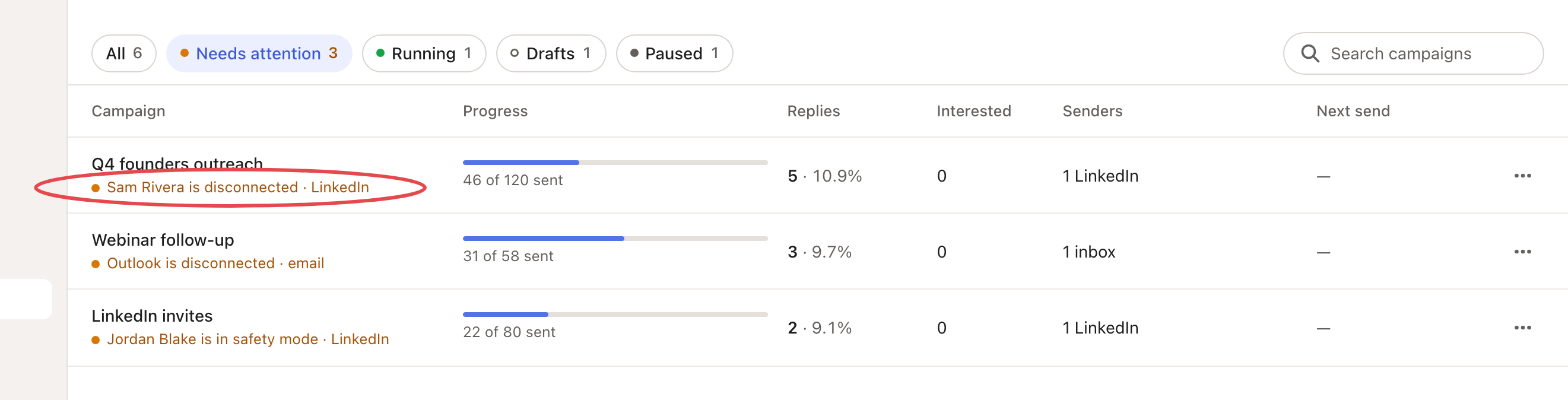
Then find what you see below.
| What you see | Why | What to do |
|---|---|---|
| "Needs a sender before launch" | No inbox or LinkedIn account is picked. | Click Finish setup and choose one. |
| The campaign says Draft or Paused | It is not running. | Open it and launch or resume it. |
| Messages sit in Copilot's Needs review | The campaign is in Review mode. | Approve them in Copilot. |
| "Campaign invites and messages from this account wait until it has a sending schedule." | The LinkedIn account has no days and hours. | Set them: see Connect your LinkedIn account, step 4. |
| "Outside this campaign’s sending hours." | It is outside the campaign's days or hours. | Wait, or click Edit schedule to widen them. |
| "…’s LinkedIn is warming up: week 1 of 3." | A new account sends a few a day for 3 weeks. | Nothing. See Warm-up and daily limits. |
| "Daily invite limit reached on …’s LinkedIn." or "This campaign’s daily invite limit is reached." | Today's invites are done. | Wait for tomorrow, or raise the limit. |
| "…’s LinkedIn is in safety mode until [date]." | LinkedIn asked the account to slow down. | Let it end on its own. |
| The LinkedIn account shows Signed out or Disconnected | Looply can't use it. | See LinkedIn statuses and warnings. |
| The inbox shows Reconnect or Disconnected | Looply can't use the inbox. | Click Reconnect in Settings → Email senders. For an IMAP / SMTP inbox it opens the form with the address filled in: enter the new password. |
| LinkedIn messages don't go out | A message waits until the person accepts your connection request. | Nothing. It sends after they accept. |
| Email steps skip some people | They have no email address. | Turn on finding missing emails in the campaign's email settings (1 credit per email found). |
| An inbox connected with Google doesn't send | Recipients' consent is not confirmed. | Confirm Recipients opted in in the campaign's email settings. |
| Nobody to write to | The list or agent behind the campaign has no people yet. | Add people, or wait for the agent's next run. |

To see exactly what happened to each person, open the campaign's Activity tab and filter on Failed.
Still stuck? Write to us from the chat with the campaign's name.